Introducing Holo1.5: Advanced Vision Models Tailored for Computer-Use Agents
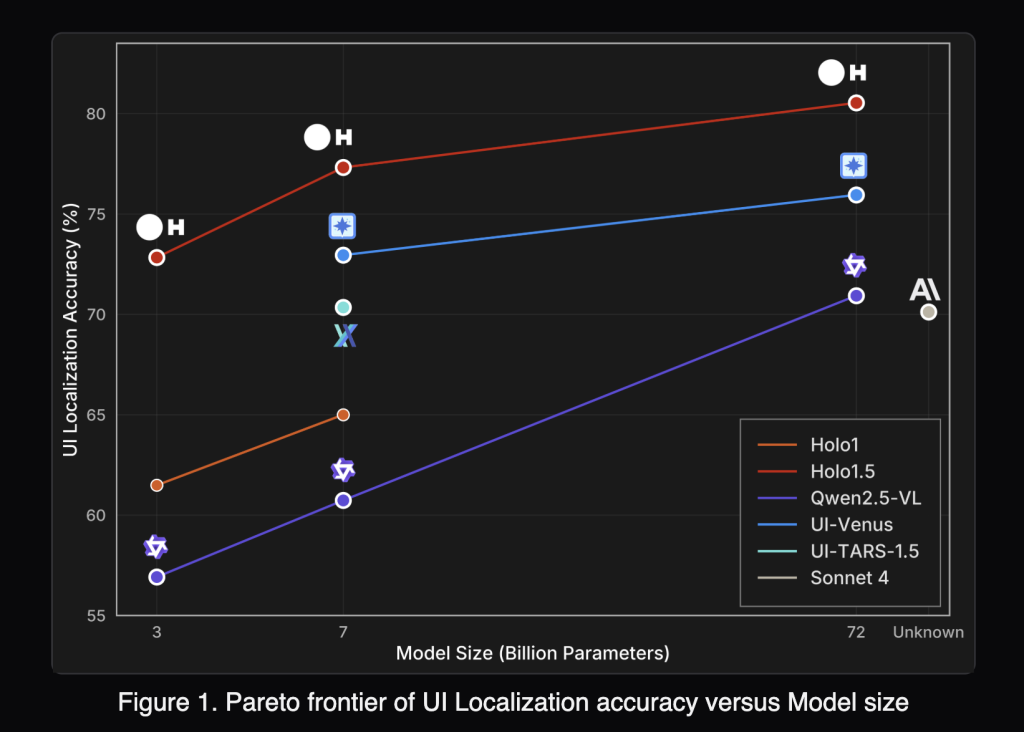
French AI innovator H Company has unveiled Holo1.5, a new suite of open foundation vision models specifically engineered for computer-use (CU) agents. These agents interact with real user interfaces by interpreting screenshots and executing pointer or keyboard commands. The release features three model sizes-3B, 7B, and 72B parameters-with documented improvements of approximately 10% in accuracy compared to the original Holo1 across all scales. Notably, the 7B model is available under the permissive Apache-2.0 license, while the 3B and 72B versions retain research-only restrictions inherited from their upstream sources. Holo1.5 primarily focuses on two critical capabilities for CU systems: precise localization of UI elements (predicting exact coordinates) and UI visual question answering (UI-VQA) to understand interface states.
Why Precise UI Element Localization Is Crucial for CU Agents
Localization enables an agent to translate user intent into exact pixel-level actions. For example, a command like “Open Spotify” requires the model to accurately identify and click the correct control on the current screen. Even a minor misclick can disrupt complex, multi-step workflows, leading to failure. Holo1.5 is trained and tested on high-resolution displays up to 3840×2160 pixels, covering desktop environments (macOS, Ubuntu, Windows), web applications, and mobile interfaces. This broad training enhances robustness, especially on dense professional UIs where small icons and crowded layouts often increase error rates.
Distinctive Features of Holo1.5 Compared to General Vision-Language Models
While general vision-language models (VLMs) excel at broad image captioning and grounding, CU agents demand pinpoint accuracy in pointing and deep comprehension of interface elements. Holo1.5 addresses these needs by aligning its training data and objectives with GUI-specific tasks. It undergoes large-scale supervised fine-tuning (SFT) on GUI datasets, followed by reinforcement learning inspired by GRPO techniques to refine coordinate precision and decision confidence. These models are designed as perception modules to be integrated into higher-level planners or executors-such as Surfer-style agents-rather than functioning as standalone end-to-end agents.
Benchmark Performance: Setting New Standards in UI Localization
Holo1.5 achieves leading results on multiple GUI grounding benchmarks, including ScreenSpot-v2, ScreenSpot-Pro, GroundUI-Web, Showdown, and WebClick. For instance, the 7B model averages a score of 77.32 across six localization tracks, significantly outperforming the Qwen2.5-VL-7B baseline, which scores 60.73.
On the challenging ScreenSpot-Pro dataset-featuring professional applications with complex, dense layouts-Holo1.5-7B attains a remarkable 57.94 compared to just 29.00 for Qwen2.5-VL-7B. This demonstrates Holo1.5’s superior ability to accurately select targets in real-world, high-density UI environments. The 3B and 72B models show similar relative improvements over their respective Qwen2.5-VL counterparts.
Enhancing UI Comprehension with Improved Visual Question Answering (UI-VQA)
Beyond localization, Holo1.5 also advances UI understanding through enhanced UI-VQA capabilities. Evaluations on VisualWebBench, WebSRC, and ScreenQA datasets reveal consistent accuracy gains. The 7B model averages around 88.17% accuracy, while the 72B variant reaches approximately 90.00%. This improved comprehension is vital for agent reliability, enabling it to answer questions like “Which tab is currently active?” or “Is the user logged in?”-thereby reducing ambiguity and facilitating verification between sequential actions.
Comparative Analysis: How Holo1.5 Stacks Up Against Specialized and Proprietary Systems
In published evaluations, Holo1.5 surpasses open-source baselines such as Qwen2.5-VL and outperforms specialized models like UI-TARS and UI-Venus. It also demonstrates advantages over closed, generalist models including Claude Sonnet 4 on key UI tasks. However, since factors like evaluation protocols, prompt design, and screen resolution can influence results, practitioners are encouraged to conduct their own tests within their specific environments before making deployment decisions.
Practical Integration Benefits for Computer-Use Agents
- Improved Click Accuracy at Native Resolutions: Enhanced performance on ScreenSpot-Pro suggests fewer misclicks in complex software such as integrated development environments (IDEs), graphic design tools, and administrative consoles.
- Enhanced State Awareness: Higher UI-VQA accuracy enables better detection of interface states, including logged-in status, active tabs, modal dialogs, and success or error notifications.
- Flexible Licensing Options: The 7B model’s Apache-2.0 license makes it suitable for commercial deployment, while the 72B checkpoint remains research-only, ideal for internal experimentation or benchmarking potential upper limits.
Positioning Holo1.5 Within the Modern Computer-Use Technology Stack
Holo1.5 functions as the screen perception layer in CU architectures:
- Input: High-resolution screenshots, optionally supplemented with UI metadata.
- Output: Precise target coordinates accompanied by confidence scores, plus concise textual answers describing the screen’s state.
- Downstream Processing: Action policies translate these outputs into mouse clicks or keyboard inputs, while monitoring systems verify outcomes and trigger retries or fallback strategies as needed.
Conclusion: Bridging the Gap in Computer-Use AI Systems
By combining robust coordinate grounding with succinct interface understanding, Holo1.5 addresses a critical need in CU agent development. For those seeking a commercially viable foundation today, the Holo1.5-7B model (Apache-2.0) offers a compelling starting point. Users are advised to benchmark it on their own interfaces and integrate it thoughtfully within their planning and safety frameworks to maximize reliability and performance.