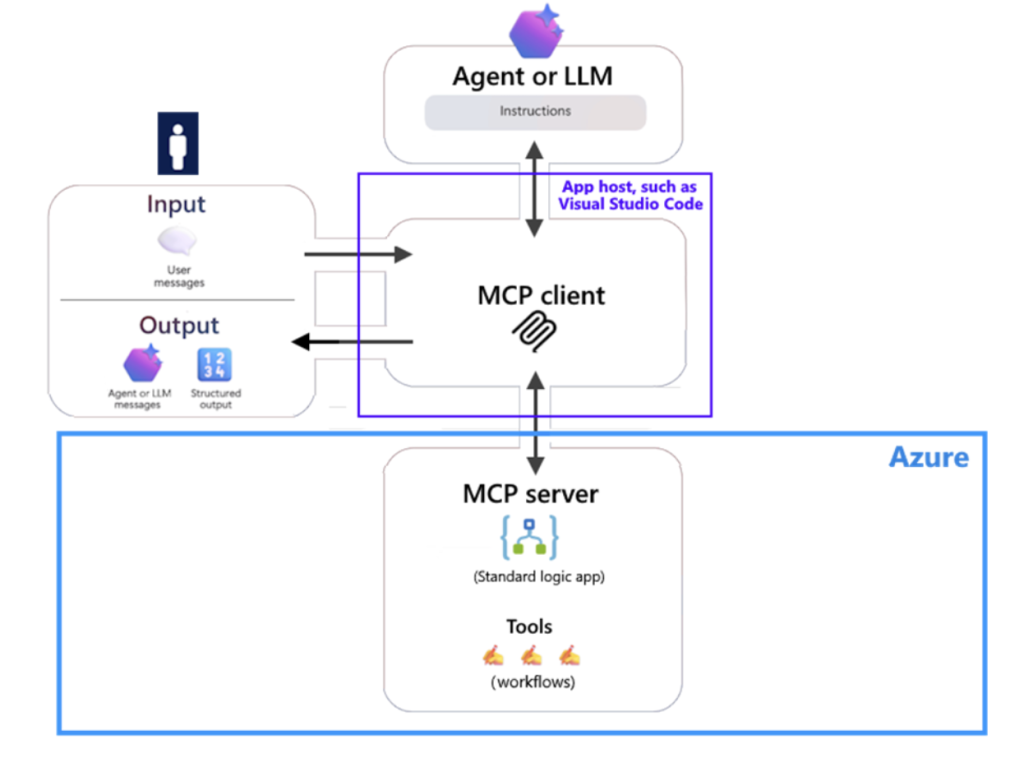
Microsoft has introduced a public preview that allows Azure Logic Apps (Standard) to function as Model Context Protocol (MCP) servers. This advancement enables Logic Apps workflows to be exposed as agent tools that MCP-compatible clients-such as VS Code integrated with Copilot-can discover and invoke seamlessly.
Overview of the New Capabilities
- Remote MCP Server Integration with Logic Apps (Standard): Users can now configure a Standard Logic App to host an MCP endpoint at
/api/mcp, transforming HTTP Request/Response workflows into accessible tools. Authentication is managed through Easy Auth, with MCP endpoints defaulting to OAuth 2.0 for secure access. Additionally, VS Code versions 1.102 and above support MCP client functionality for testing these integrations. - API Center Registration (Preview): MCP servers can be created and registered within the Azure API Center. This feature allows selected actions from managed connectors to be cataloged as tools, providing enhanced governance and discoverability across teams.
Technical Prerequisites and Communication Protocols
- Workflow Design: To qualify as MCP tools, workflows must start with an HTTP Request trigger (specifically, “When a HTTP request is received”) and conclude with a Response action.
- Authentication and Access Control: MCP leverages OAuth 2.0 by default, with Easy Auth enforcing client, identity, and tenant restrictions. During setup, App Service authentication should permit unauthenticated requests, although OAuth validation still occurs within the MCP flow.
- Supported Transports: Streamable HTTP is supported natively. For Server-Sent Events (SSE), additional configuration is required, including VNET integration and enabling cross-worker communication via the
host.jsonsetting:Runtime.Backend.EdgeWorkflowRuntimeTriggerListener.AllowCrossWorkerCommunication=true. - Activation: MCP API endpoints are activated by setting
extensions.workflow.McpServerEndpoints.enable=truein the host.json configuration file.
API Center Integration: Current Preview Constraints
When registering MCP servers through the API Center backed by Logic Apps, the preview version imposes several limitations that impact scalability and flexibility:
- Start with a blank Standard Logic App resource.
- Only one connector per MCP server is supported.
- Built-in service providers and custom connectors are not yet supported; only managed connectors are allowed.
- Each tool can expose only one action.
These restrictions influence how tools are structured and deployed, especially in larger enterprise environments.
Why Choose Standard (Single-Tenant) Logic Apps?
The Standard tier operates on a single-tenant Logic Apps runtime hosted on Azure Functions, enabling multiple workflows within a single app. It also supports integration with virtual networks and private endpoints, which is crucial for securely exposing internal systems to agents while ensuring consistent performance and low latency. In contrast, the Consumption tier is multi-tenant, supports only one workflow per app, and charges based on execution count, making it less suitable for enterprise-grade agent tooling.
Enhancing Tool Usability and Discovery
To optimize agent interaction, Microsoft advises enriching workflows with detailed trigger descriptions, comprehensive parameter schemas and explanations, and clear required field indicators. These metadata elements improve tool discoverability and ensure agents invoke workflows accurately and efficiently.
Expanding Enterprise Integration with Connectors
Through MCP, organizations can expose existing workflows and leverage a vast array of Logic Apps connectors-spanning both cloud-based and on-premises systems-as callable agent tools. This capability facilitates seamless integration across diverse enterprise environments, enabling automation and intelligent agent interactions at scale.
Monitoring, Governance, and Validation Tools
Operational oversight is supported via run history and integration with Application Insights and Log Analytics, providing robust diagnostics and audit trails. Developers can validate MCP server configurations quickly using VS Code’s MCP: Add Server feature, which includes OAuth sign-in and tool enumeration. Registering MCP servers through the API Center further enhances governance and discovery across organizational teams.
Important Considerations for Production Deployment (Preview)
- SSE Support: Requires both VNET integration and enabling cross-worker communication; otherwise, streamable HTTP should be used.
- Easy Auth Configuration: Precise setup is critical, including enabling the “allow unauthenticated” option, to prevent client sign-in failures despite OAuth enforcement.
- Operational Responsibilities: Throttling, idempotency, and schema versioning remain the user’s responsibility when wrapping connectors as agent tools. Early adopters have reported similar challenges, emphasizing the need for careful operational planning.
Conclusion
This public preview effectively brings MCP capabilities to Azure Logic Apps (Standard), allowing HTTP-based workflows to be exposed as OAuth-secured tools. These tools can be cataloged within the API Center and securely connected to private systems via single-tenant networking. For teams already utilizing Logic Apps, this represents a streamlined, standards-compliant approach to operationalizing enterprise-grade agent tooling. However, it is essential to consider the current API Center limitations, SSE configuration requirements, and Easy Auth setup nuances during implementation.