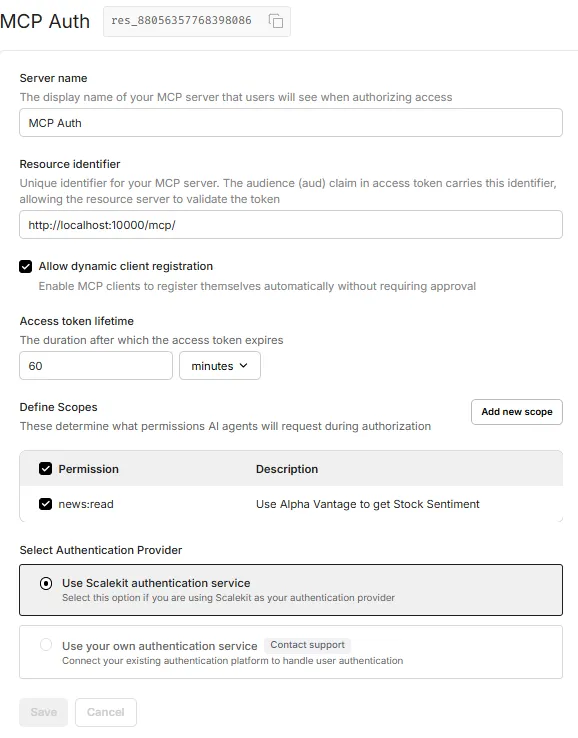
This guide walks you through the process of integrating OAuth 2.1 authentication into an MCP server, using a practical example of a finance sentiment analysis service secured with Scalekit. Scalekit simplifies OAuth implementation by managing token workflows and authorization behind the scenes, allowing you to focus on building your application.
Preparing Your Environment and Tools
Obtaining Alpha Vantage API Access
To analyze stock market sentiment, we’ll utilize the Alpha Vantage API. Follow these steps to acquire a free API key:
- Navigate to the Alpha Vantage website.
- Register by providing your email and other required information.
- Once registered, you will receive an API key-store it securely as it is essential for authenticating your API calls.
Installing Node.js for MCP Inspector
Node.js is necessary to run the MCP Inspector tool, which helps test your MCP server:
- Download the latest Node.js version from the official site.
- Run the installer and follow the default setup instructions.
Python Package Requirements
Install the following Python libraries to support the MCP server and OAuth integration:
pip install fastapi fastmcp mcp scalekit-sdk-python python-dotenv httpxSetting Up Your Scalekit Account
Begin by creating a Scalekit account to manage OAuth permissions and MCP server configurations:
- Sign up on the Scalekit platform; a free tier is available for development.
- After logging in, activate the “Full-Stack Auth” feature.
Defining Permissions
Within Scalekit, permissions control access scopes for your MCP server:
- Navigate to the Authorization section and add a new permission.
- Use the following details:
Permission Name: news:read
Description: Access stock sentiment data via Alpha Vantage
This permission enables your MCP server to retrieve stock sentiment information, while additional permissions can be created to secure other resources.
Registering Your MCP Server
- Go to the MCP Servers area and add a new server.
- Provide a server name of your choice.
- Set the Resource Identifier uniquely; for local testing, use:
http://localhost:10000/mcp/(include the trailing slash). - Assign the scope to
news:read.
Scalekit will generate resource metadata and an MCP Server Identifier (e.g., res_88056357768398086)-keep this for later use.
Example of Resource Metadata
Your MCP server’s metadata endpoint will resemble the following:
/.well-known/oauth-protected-resource/mcpAnd the JSON response might look like this:
{
  "authorization_servers": [
    "https://zapp.scalekit.dev/resources/res_88056357768398086"
  ],
  "bearer_methods_supported": ["header"],
  "resource": "http://localhost:10000/mcp/",
  "resource_documentation": "http://localhost:10000/mcp/docs",
  "scopes_supported": ["news:read"]
}
Retrieving API Credentials
- Access the Settings → API Credentials section in Scalekit.
- Copy your Client ID and Environment URL.
- Generate a new Secret Key and save it securely.
Configuring Environment Variables
Create a .env file to store all necessary configuration values:
ALPHA_VANTAGE_API_KEY=<YOUR_ALPHA_VANTAGE_API_KEY>
METADATA_JSON_RESPONSE=<YOUR_METADATA_JSON_RESPONSE>

SCALEKIT_ENVIRONMENT_URL=<YOUR_SCALEKIT_ENVIRONMENT_URL>
SCALEKIT_CLIENT_ID=<YOUR_SCALEKIT_CLIENT_ID>
SCALEKIT_CLIENT_SECRET=<YOUR_SCALEKIT_CLIENT_SECRET>
SCALEKIT_RESOURCE_METADATA_URL=<YOUR_SCALEKIT_RESOURCE_METADATA_URL>
SCALEKIT_AUTHORIZATION_SERVERS=<YOUR_SCALEKIT_AUTHORIZATION_SERVERS>
SCALEKIT_AUDIENCE_NAME=<YOUR_SCALEKIT_AUDIENCE_NAME>
SCALEKIT_RESOURCE_NAME=<YOUR_SCALEKIT_RESOURCE_NAME>
SCALEKIT_RESOURCE_DOCS_URL=<YOUR_SCALEKIT_RESOURCE_DOCS_URL>
Explanation of Key Variables
- ALPHA_VANTAGE_API_KEY: Your personal API key for accessing Alpha Vantage data.
- METADATA_JSON_RESPONSE: The JSON metadata generated by Scalekit for your MCP server.
- SCALEKIT_ENVIRONMENT_URL: The environment URL from Scalekit settings.
- SCALEKIT_CLIENT_ID: Client identifier from Scalekit.
- SCALEKIT_CLIENT_SECRET: Secret key generated in Scalekit.
- SCALEKIT_RESOURCE_METADATA_URL: URL exposed by your MCP server for metadata discovery.
- SCALEKIT_AUTHORIZATION_SERVERS: URL referencing your MCP Server Identifier.
- SCALEKIT_AUDIENCE_NAME: Audience claim used in access tokens for validation.
- SCALEKIT_RESOURCE_NAME: The resource name of your MCP server, typically matching the audience.
- SCALEKIT_RESOURCE_DOCS_URL: URL hosting your MCP server’s documentation.
Loading Configuration in Python (config.py)
import os
from dotenv import load_dotenv

load_dotenv()

class Settings:
    ALPHA_VANTAGE_API_KEY = os.getenv('ALPHA_VANTAGE_API_KEY')
    METADATA_JSON_RESPONSE = os.getenv('METADATA_JSON_RESPONSE')
    SCALEKIT_ENVIRONMENT_URL = os.getenv('SCALEKIT_ENVIRONMENT_URL')
    SCALEKIT_CLIENT_ID = os.getenv('SCALEKIT_CLIENT_ID')
    SCALEKIT_CLIENT_SECRET = os.getenv('SCALEKIT_CLIENT_SECRET')
    SCALEKIT_RESOURCE_METADATA_URL = os.getenv('SCALEKIT_RESOURCE_METADATA_URL')
    SCALEKIT_AUTHORIZATION_SERVERS = os.getenv('SCALEKIT_AUTHORIZATION_SERVERS')
    SCALEKIT_AUDIENCE_NAME = os.getenv('SCALEKIT_AUDIENCE_NAME')
    SCALEKIT_RESOURCE_NAME = os.getenv('SCALEKIT_RESOURCE_NAME')
    SCALEKIT_RESOURCE_DOCS_URL = os.getenv('SCALEKIT_RESOURCE_DOCS_URL')
    PORT = 10000

settings = Settings()
Implementing Stock Sentiment Retrieval (finance.py)
This module fetches the latest news sentiment for a specified stock ticker using Alpha Vantage’s API, returning a concise summary of the top three articles.
from mcp.server.fastmcp import FastMCP
from typing import Any
import httpx
from config import settings

mcp = FastMCP("finance-news")

BASE_URL = "https://www.alphavantage.co/query"

async def fetch_alpha_vantage(endpoint: str, params: dict[str, Any]) -> dict[str, Any] | None:
    params["apikey"] = settings.ALPHA_VANTAGE_API_KEY
    params["function"] = endpoint
    async with httpx.AsyncClient() as client:
        try:
            response = await client.get(BASE_URL, params=params, timeout=30.0)
            response.raise_for_status()
            return response.json()
        except Exception:
            return None

@mcp.tool()
async def get_news_sentiment(ticker: str) -> str:
    data = await fetch_alpha_vantage("NEWS_SENTIMENT", {"tickers": ticker.upper()})
    if not data or "feed" not in data:
        return "Unable to fetch news sentiment at this time."

    articles = data["feed"][:3]
    summaries = []
    for article in articles:
        summaries.append(f"""
📰 {article['title']}
Summary: {article['summary']}
Source: {article['source']} | Published: {article['time_published']}
""")
    return "n---n".join(summaries)
Creating Authorization Middleware
This middleware layer ensures that only requests with valid OAuth 2.1 Bearer tokens can access protected MCP endpoints. It bypasses public metadata paths and validates tokens using the Scalekit client. Invalid or missing tokens result in a 401 Unauthorized response with detailed error information.
import json
import logging
from fastapi import HTTPException, Request
from fastapi.security import HTTPBearer
from fastapi.responses import JSONResponse
from scalekit import ScalekitClient
from starlette.middleware.base import BaseHTTPMiddleware
from config import settings

logging.basicConfig(
    level=logging.INFO,
    format='%(asctime)s - %(name)s - %(levelname)s - %(message)s'
)
logger = logging.getLogger(__name__)

security = HTTPBearer()

scalekit_client = ScalekitClient(
    settings.SCALEKIT_ENVIRONMENT_URL,
    settings.SCALEKIT_CLIENT_ID,
    settings.SCALEKIT_CLIENT_SECRET
)

class AuthMiddleware(BaseHTTPMiddleware):
    async def dispatch(self, request: Request, call_next):
        if request.url.path.startswith("/.well-known/"):
            return await call_next(request)

        auth_header = request.headers.get("Authorization")
        if not auth_header or not auth_header.startswith("Bearer "):
            return JSONResponse(
                status_code=401,
                content={"error": "unauthorized", "error_description": "Authorization header missing or invalid"},
                headers={"WWW-Authenticate": f'Bearer realm="OAuth", resource_metadata="{settings.SCALEKIT_RESOURCE_METADATA_URL}"'}
            )

        token = auth_header.split(" ")[1]

        try:
            scalekit_client.validate_access_token(token)
        except Exception as e:
            logger.warning(f"Token validation failed: {e}")
            return JSONResponse(
                status_code=401,
                content={"error": "unauthorized", "error_description": "Invalid or expired token"},
                headers={"WWW-Authenticate": f'Bearer realm="OAuth", resource_metadata="{settings.SCALEKIT_RESOURCE_METADATA_URL}"'}
            )

        return await call_next(request)
Building the MCP Server Application (server.py)
This script initializes a FastAPI app integrated with the MCP server for stock sentiment analysis, incorporating CORS and authentication middleware. It also exposes the OAuth 2.1 protected resource metadata endpoint required for client discovery.
import contextlib
import uvicorn
from fastapi import FastAPI
from fastapi.middleware.cors import CORSMiddleware
from auth import AuthMiddleware
from config import settings
from finance import mcp as finance_news_server

@contextlib.asynccontextmanager
async def lifespan(app: FastAPI):
    async with finance_news_server.session_manager.run():
        yield

app = FastAPI(lifespan=lifespan)

app.add_middleware(
    CORSMiddleware,
    allow_origins=["*"],  # Restrict origins in production
    allow_credentials=True,
    allow_methods=["GET", "POST", "PUT", "DELETE", "OPTIONS"],
    allow_headers=["*"],
)

@app.get("/.well-known/oauth-protected-resource/mcp")
async def protected_resource_metadata():
    return {
        "authorization_servers": [settings.SCALEKIT_AUTHORIZATION_SERVERS],
        "bearer_methods_supported": ["header"],
        "resource": settings.SCALEKIT_RESOURCE_NAME,
        "resource_documentation": settings.SCALEKIT_RESOURCE_DOCS_URL,
        "scopes_supported": ["mcp:tools:news:read"],
    }

mcp_server = finance_news_server.streamable_http_app()
app.add_middleware(AuthMiddleware)
app.mount("/", mcp_server)

def main():
    uvicorn.run(app, host="localhost", port=settings.PORT, log_level="debug")

if __name__ == "__main__":
    main()
Launching and Testing Your MCP Server
Start your server by running:
python server.pyThis will launch the application on localhost:10000. To verify the setup, open a new terminal and execute:
npx @modelcontextprotocol/inspectorIn the MCP Inspector interface, enter http://localhost:10000/mcp as the server URL. If you attempt to connect without valid credentials, you will receive an error indicating connection failure.
Provide the Bearer token generated in Scalekit to authenticate successfully. Once authenticated, you can invoke the MCP tools and access stock sentiment data securely.