

Introducing Chrome DevTools MCP: Revolutionizing AI-Powered Web Debugging
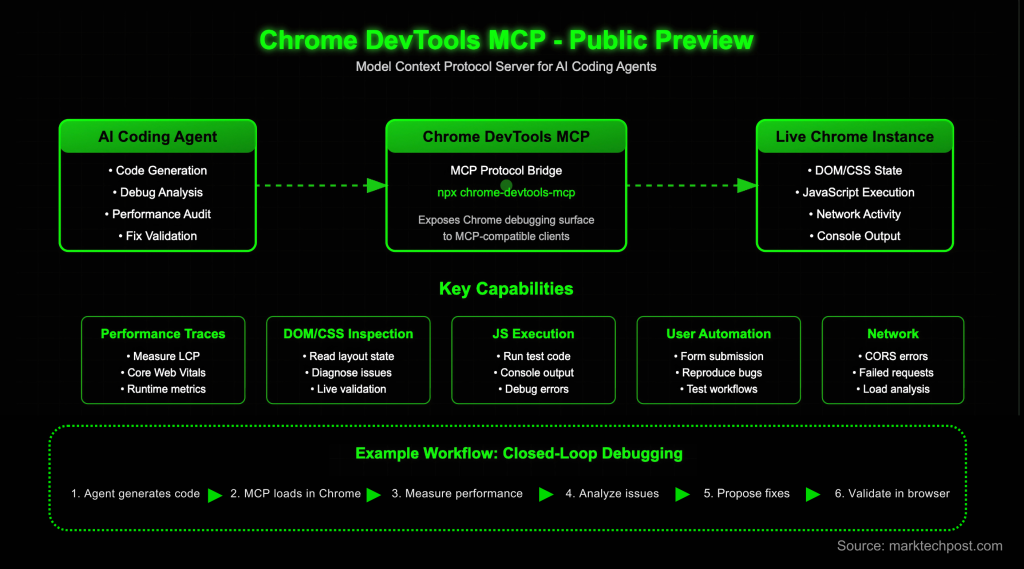
Google has unveiled the Chrome DevTools Model Context Protocol (MCP) server, a groundbreaking tool that empowers AI-driven coding assistants to interact directly with a live Chrome browser instance. This innovation enables agents to monitor runtime behaviors-such as capturing performance metrics, examining the Document Object Model (DOM) and CSS, executing JavaScript commands, reading console logs, and automating user interactions. By bridging AI agents with Chrome’s DevTools through MCP, Google addresses a critical shortcoming of code-generating models: their inability to observe and respond to real-time page execution. This integration transforms static code suggestion tools into dynamic, feedback-driven debuggers that validate and refine fixes based on actual browser data.
Understanding the Chrome DevTools MCP Framework
MCP is an open standard designed to connect large language models (LLMs) with external tools and datasets. Specifically, the Chrome DevTools MCP server exposes Chrome’s debugging capabilities to any MCP-compatible client, effectively extending AI assistants’ reach into the browser environment. For instance, an AI agent can initiate a performance trace on a webpage using commands like performance_start_trace, analyze the collected data, and recommend targeted optimizations-such as identifying and addressing bottlenecks causing slow Largest Contentful Paint (LCP) times.
Key Features and Functionalities
The MCP server offers a comprehensive suite of commands documented in its official GitHub repository. Beyond performance monitoring (performance_start_trace, performance_stop_trace, performance_analyze_insight), it supports navigation controls (navigate_page, new_page, wait_for), user interaction simulations (click, fill, drag, hover), and runtime inspections (list_console_messages, evaluate_script, list_network_requests, get_network_request). Additionally, it can capture screenshots and DOM snapshots to facilitate visual regression testing and state comparisons. Underneath, the server leverages Puppeteer for robust automation and synchronization, communicating with Chrome through the Chrome DevTools Protocol (CDP).
Effortless Setup and Integration
Setting up the Chrome DevTools MCP server is streamlined for developers. Google recommends a simple configuration snippet that invokes the latest server version via npx:
{
  "mcpServers": {
    "chrome-devtools": {
      "command": "npx",
      "args": ["chrome-devtools-mcp@latest"]
    }
  }
}
This server seamlessly integrates with various AI coding frontends, including Gemini CLI, Claude Code, Cursor, and GitHub Copilot’s MCP-enabled features. For example, VS Code users can add the server with a single command (code --add-mcp), while Claude Code users employ claude mcp add to achieve the same. The package requires Node.js version 22 or higher and a current Chrome installation.
Practical Use Cases and Agent Workflows
Google’s demonstration highlights several real-world scenarios where AI agents leverage MCP to enhance web development workflows. These include verifying fixes live in the browser, diagnosing network errors such as CORS issues or blocked resources, reproducing bugs through simulated user actions like form submissions, inspecting layout problems by querying DOM and CSS states, and conducting automated performance audits to improve Core Web Vitals metrics like LCP. By grounding these operations in actual browser telemetry, agents can move beyond heuristic guesses to data-driven decision-making.
Why Chrome DevTools MCP Marks a Turning Point
The public preview of Chrome DevTools MCP represents a significant advancement in AI-assisted frontend development. By providing direct access to real-time browser telemetry-including performance traces, DOM and CSS snapshots, network activity, and console logs-this tool enables AI assistants to offer recommendations based on precise measurements rather than assumptions. Delivered as a first-party server from the Chrome DevTools team and installable via npx, MCP supports a variety of clients and relies on Chrome’s DevTools Protocol for communication. Developers can expect faster debugging cycles, more reliable UI testing, and improved validation of performance enhancements.





