

In practical machine learning applications, one of the most significant hurdles is the dependency of supervised models on labeled datasets. However, real-world data often arrives unlabeled, making the manual annotation of thousands of samples not only time-consuming but also costly and labor-intensive.
Active learning offers a powerful solution to this dilemma.
Active learning is a specialized branch of machine learning where the model takes an interactive role in the data labeling process. Instead of passively consuming a fully labeled dataset, the algorithm selectively identifies the most informative data points that require labeling. By querying an expert or oracle for annotations on these uncertain samples, the model accelerates its learning curve while drastically reducing the number of labels needed. This approach is especially valuable in domains where labeling is expensive or slow.
Understanding the Active Learning Cycle
The typical active learning workflow unfolds as follows:
- Start by manually labeling a small subset of the dataset to train an initial, rudimentary model.
- Use this preliminary model to predict labels and estimate confidence scores on the remaining unlabeled data.
- Calculate uncertainty metrics (such as margin confidence or entropy) for each prediction.
- Identify and select the samples with the highest uncertainty-those the model is least confident about.
- Obtain manual labels for these selected samples and incorporate them into the training set.
- Retrain the model with the expanded labeled dataset and repeat the process iteratively.
- After multiple cycles, the model can reach performance levels comparable to fully supervised training but with significantly fewer labeled examples.
This iterative querying and retraining strategy ensures that annotation efforts are concentrated where they matter most, optimizing both time and resources.
Setting Up the Environment and Dependencies
For this demonstration, we will utilize Python libraries such as numpy, pandas, scikit-learn, and matplotlib. These tools facilitate data manipulation, model training, and visualization.
pip install numpy pandas scikit-learn matplotlib

import numpy as np
import matplotlib.pyplot as plt
from sklearn.datasets import make_classification
from sklearn.linear_model import LogisticRegression
from sklearn.model_selection import train_test_split
from sklearn.metrics import accuracy_score
We will generate a synthetic dataset using make_classification from scikit-learn to simulate a binary classification problem.
Defining Experiment Parameters
SEED = 42  # Ensures reproducibility
TOTAL_SAMPLES = 1000  # Number of data points
INITIAL_LABEL_RATIO = 0.10  # Start with 10% labeled data
ANNOTATION_BUDGET = 20  # Number of samples to query for labeling
The ANNOTATION_BUDGET represents the maximum number of samples the model will request labels for during the active learning process. In a real-world scenario, each query corresponds to a human annotation, which incurs cost and time. Here, we simulate this by automatically revealing the true label for the selected samples.
Data Creation and Partitioning for Active Learning
We begin by synthesizing 1,000 samples with 10 features, of which 5 are informative for the classification task. The dataset is split into a 10% test set for final evaluation and a 90% pool for training. From the training pool, only 10% is initially labeled, reflecting a realistic scenario where labeled data is scarce. The remaining 90% remains unlabeled and available for querying.
X, y = make_classification(
    n_samples=TOTAL_SAMPLES, n_features=10, n_informative=5, n_redundant=0,
    n_classes=2, n_clusters_per_class=1, flip_y=0.1, random_state=SEED
)

# Split into training pool and test set
X_pool, X_test, y_pool, y_test = train_test_split(
    X, y, test_size=0.10, random_state=SEED, stratify=y
)

# Further split training pool into initial labeled and unlabeled sets
X_labeled, X_unlabeled, y_labeled, y_unlabeled = train_test_split(
    X_pool, y_pool, test_size=1 - INITIAL_LABEL_RATIO,
    random_state=SEED, stratify=y_pool
)

# Track indices of unlabeled samples for efficient querying
unlabeled_indices = set(range(X_unlabeled.shape[0]))

print(f"Initial labeled samples: {len(y_labeled)}")
print(f"Unlabeled pool size: {len(unlabeled_indices)}")
Baseline Model Training and Initial Evaluation
Using the small labeled subset, we train a Logistic Regression model and evaluate its accuracy on the reserved test set. This baseline performance serves as a reference point to measure improvements gained through active learning.
labeled_counts = []
accuracy_scores = []

# Train initial model
model = LogisticRegression(random_state=SEED, max_iter=2000)
model.fit(X_labeled, y_labeled)

# Evaluate on test data
initial_predictions = model.predict(X_test)
initial_accuracy = accuracy_score(y_test, initial_predictions)

# Record baseline metrics
labeled_counts.append(len(y_labeled))
accuracy_scores.append(initial_accuracy)

print(f"Baseline accuracy with {len(y_labeled)} labeled samples: {initial_accuracy:.4f}")
Executing the Active Learning Process
The core of active learning lies in iteratively selecting the most uncertain samples, acquiring their labels, and retraining the model. At each iteration:
- The model predicts probabilities for all unlabeled samples.
- Samples with the lowest confidence (highest uncertainty) are identified.
- The most uncertain sample is “queried” for its true label.
- The newly labeled sample is added to the training set.
- The model is retrained and evaluated on the test set.
This loop continues until the annotation budget is exhausted, demonstrating how targeted labeling can rapidly enhance model accuracy.
print(f"nStarting Active Learning with {ANNOTATION_BUDGET} queries...")

for query_num in range(ANNOTATION_BUDGET):
    if not unlabeled_indices:
        print("No more unlabeled samples available.")
        break

    # Predict probabilities for unlabeled samples
    probs = model.predict_proba(X_unlabeled)
    max_confidences = np.max(probs, axis=1)

    # Calculate uncertainty as inverse of confidence
    uncertainties = 1 - max_confidences

    # Identify the most uncertain sample
    current_unlabeled_indices = list(unlabeled_indices)
    current_uncertainties = uncertainties[current_unlabeled_indices]
    most_uncertain_idx = np.argmax(current_uncertainties)
    sample_idx = current_unlabeled_indices[most_uncertain_idx]
    uncertainty_value = uncertainties[sample_idx]

    # Simulate human annotation by revealing true label
    new_sample = X_unlabeled[sample_idx].reshape(1, -1)
    new_label = np.array([y_unlabeled[sample_idx]])

    # Add new sample to labeled dataset
    X_labeled = np.vstack([X_labeled, new_sample])
    y_labeled = np.hstack([y_labeled, new_label])

    # Remove sample from unlabeled pool
    unlabeled_indices.remove(sample_idx)

    # Retrain model with updated labeled set
    model = LogisticRegression(random_state=SEED, max_iter=2000)
    model.fit(X_labeled, y_labeled)

    # Evaluate updated model
    preds = model.predict(X_test)
    acc = accuracy_score(y_test, preds)

    # Log progress
    labeled_counts.append(len(y_labeled))
    accuracy_scores.append(acc)

    print(f"Query {query_num + 1}: Labeled samples = {len(y_labeled)}, Test accuracy = {acc:.4f}, Uncertainty = {uncertainty_value:.4f}")

final_accuracy = accuracy_scores[-1]
Summary of Results
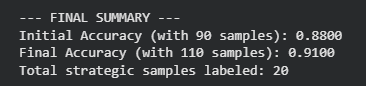
This experiment highlights the effectiveness of active learning in maximizing model performance with minimal labeling effort. By selectively annotating just 20 additional samples-boosting the labeled dataset from 100 to 120-the model’s accuracy on unseen data improved from approximately 88% to 91%. This 3% gain was achieved with only a 20% increase in labeled data, underscoring the efficiency of strategic sample selection.
Active learning essentially acts as a smart curator, ensuring that every annotation contributes significantly to model improvement, making it a cost-effective alternative to random or exhaustive labeling.
Visualizing the Learning Curve
To better understand the impact of active learning, we plot the model’s accuracy against the number of labeled samples throughout the iterative process.
plt.figure(figsize=(10, 6))
plt.plot(labeled_counts, accuracy_scores, marker='o', linestyle='-', color='teal', label='Active Learning (Uncertainty Sampling)')
plt.axhline(y=final_accuracy, color='red', linestyle='--', alpha=0.6, label='Final Accuracy')
plt.title('Model Accuracy vs. Number of Labeled Samples')
plt.xlabel('Number of Labeled Samples')
plt.ylabel('Accuracy on Test Set')
plt.grid(True, linestyle='--', alpha=0.7)
plt.legend()
plt.tight_layout()
plt.show()





