

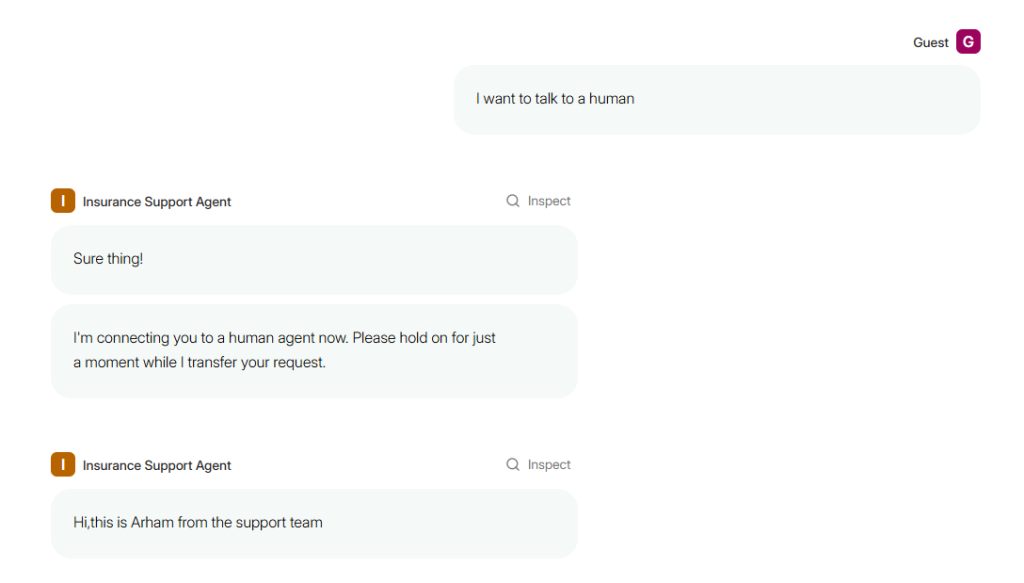
Integrating human intervention within automated customer support is essential to ensure smooth service continuity when AI encounters limitations. This guide demonstrates how to develop a human handoff system for an AI-driven insurance assistant using Parlant. You will learn to build a Streamlit interface that enables a Tier 2 human agent to monitor live customer interactions and respond directly within the same session, effectively merging AI automation with human expertise.
Preparing Your Environment
Before diving in, ensure you have an active OpenAI API key. After generating it from your OpenAI dashboard, securely store it in a .env file at your project’s root directory as follows:
OPENAIAPIKEY=yourapikeyhereThis approach safeguards your credentials by avoiding hardcoding sensitive information in your source code.
Next, install the necessary Python packages:
pip install parlant dotenv streamlitConstructing the AI Insurance Agent (agent.py)
We begin by scripting the AI agent’s core logic, which includes defining its tools, conversation flows, domain-specific glossary, and the mechanism for escalating to human support. This foundation enables the insurance assistant to handle typical queries and smoothly transfer complex cases to human operators.
Importing Essential Modules
import asyncio
import os
from datetime import datetime
from dotenv import loaddotenv
import parlant.sdk as p

loaddotenv()
Implementing Agent Tools
Here are three asynchronous tools simulating typical insurance assistant functions:
@p.tool
async def retrieveopenclaims(context: p.ToolContext) -> p.ToolResult:
    return p.ToolResult(data=["Claim #789 - Under Review", "Claim #101 - Settled"])

@p.tool
async def submitclaim(context: p.ToolContext, details: str) -> p.ToolResult:
    return p.ToolResult(data=f"Claim successfully submitted: {details}")

@p.tool
async def fetchpolicyinfo(context: p.ToolContext) -> p.ToolResult:
    return p.ToolResult(data={
        "policyid": "POL-9922",
        "coverage": "Protection against fire and flood damage up to $75,000"
})- retrieveopenclaims: Fetches a list of active insurance claims, providing users with current status updates.
- submitclaim: Accepts claim details and simulates filing a new claim, returning a confirmation message.
- fetchpolicyinfo: Supplies key policy information, including coverage specifics, to answer customer inquiries accurately.
Enabling Human Handoff
To ensure seamless escalation, the following tool allows the AI to transfer conversations to a human agent when necessary:
@p.tool
async def triggerhumanhandoff(context: p.ToolContext, reason: str) -> p.ToolResult:
    """
    Transfers the session to a human agent when AI assistance is insufficient.
    """
    print(f"🚨 Initiating human handoff due to: {reason}")
    return p.ToolResult(
        data=f"Human handoff triggered because: {reason}",
        control={
            "mode": "manual"  # Switches session control to manual
        }
    )
This function pauses AI responses and hands over control to a human operator, ensuring complex or sensitive issues receive appropriate attention.
Creating a Domain-Specific Glossary
Defining a glossary helps the AI maintain consistent and accurate responses for frequently asked terms:
async def setupglossary(agent: p.Agent):
    await agent.createterm(
        name="Support Hotline",
        description="Call us anytime at +1-800-INSURE-NOW",
    )
    await agent.createterm(
        name="Business Hours",
        description="Our team is available Monday to Friday, 8AM to 7PM",
    )
Designing Conversation Journeys
We define structured conversation flows to guide the AI’s interactions:
Claim Submission Flow
async def buildclaimjourney(agent: p.Agent) -> p.Journey:
    journey = await agent.createjourney(
        title="Submit an Insurance Claim",
        description="Assists customers in reporting and filing new claims.",
        conditions=["Customer wants to file a claim"],
    )

    s0 = await journey.initialstate.transitionto(chatstate="Request accident details")
    s1 = await s0.target.transitionto(toolstate=submitclaim, condition="Details provided by customer")
    s2 = await s1.target.transitionto(chatstate="Confirm claim submission", condition="Claim filed successfully")
    await s2.target.transitionto(state=p.ENDJOURNEY, condition="Customer acknowledges confirmation")

    return journey
Policy Explanation Flow
async def buildpolicyjourney(agent: p.Agent) -> p.Journey:
    journey = await agent.createjourney(
        title="Explain Insurance Policy",
        description="Provides detailed information about customer's policy coverage.",
        conditions=["Customer inquires about policy details"],
    )

    s0 = await journey.initialstate.transitionto(toolstate=fetchpolicyinfo)
    await s0.target.transitionto(
        chatstate="Clarify policy coverage",
        condition="Policy data retrieved",
    )

    await agent.createguideline(
        condition="Customer requests legal advice on policy",
        action="Politely inform that legal counsel cannot be provided",
    )
    return journey
The claim journey automates the claim filing process, while the policy journey offers clear explanations of coverage, ensuring compliance by avoiding legal interpretations.
Launching the Agent
async def main():
    async with p.Server() as server:
        agent = await server.createagent(
            name="AI Insurance Assistant",
            description=(
                "A friendly Tier-1 AI helping with claims and policy inquiries. "
                "Escalates complex issues to human Tier-2 agents."
            ),
        )

        await setupglossary(agent)

        claimflow = await buildclaimjourney(agent)
        policyflow = await buildpolicyjourney(agent)

        statuscheck = await agent.createobservation(
            "Customer mentions an issue without specifying claim or policy"
        )
        await statuscheck.disambiguate([claimflow, policyflow])

        await agent.createguideline(
            condition="Customer asks unrelated questions",
            action="Kindly redirect to insurance-related topics only",
        )

        await agent.createguideline(
            condition="Customer requests human help or AI is uncertain",
            action="Trigger human handoff and alert Tier-2 support",
            tools=[triggerhumanhandoff],
        )

        print("✅ AI Insurance Assistant with Human Handoff is operational! Access the Parlant UI to start chatting.")

if name == "main":
    asyncio.run(main())
Run the agent locally with:
python agent.pyThis will start the Parlant server, managing conversation logic and session states.
Building the Human Handoff Interface (handoff.py)
Importing Required Libraries
import asyncio
import streamlit as st
from datetime import datetime
from parlant.client import AsyncParlantClient
Connecting to the Parlant Server
Assuming the AI agent is running locally (default at http://localhost:8800), we establish an asynchronous client connection:
client = AsyncParlantClient(baseurl="http://localhost:8800")Use the session ID generated by the AI agent to link this interface to the specific conversation.
Managing Session State in Streamlit
To maintain chat history and track the latest events, we utilize Streamlit’s sessionstate:
if "events" not in st.sessionstate:
    st.sessionstate.events = []
if "lastoffset" not in st.sessionstate:
    st.sessionstate.lastoffset = 0
Displaying Messages Clearly
This function formats messages in the UI, distinguishing between customer, AI, and human agent contributions for better readability:
def displaymessage(text, origin, sendername, timestamp):
    if origin == "customer":
        st.markdown(f"🧑 Customer [{timestamp}]: {text}")
    elif origin == "aiagent":
        st.markdown(f"🤖 AI [{timestamp}]: {text}")
    elif origin == "humanagent":
        st.markdown(f"🙋 {sendername} [{timestamp}]: {text}")
    elif origin == "humanagentonbehalfofaiagent":
        st.markdown(f"👤 (Human as AI) [{timestamp}]: {text}")
Retrieving New Messages from Parlant
This asynchronous function fetches recent chat events for the specified session, updating the local event list:
async def retrieveevents(sessionid):
    try:
        events = await client.sessions.listevents(
            sessionid=sessionid,
            kinds="message",
            minoffset=st.sessionstate.lastoffset,
            waitfordata=5
        )
        for event in events:
            msg = event.data.get("message")
            src = event.source
            participant = event.data.get("participant", {}).get("displayname", "Unknown")
            timestamp = getattr(event, "created", None) or event.data.get("created", "Unknown Time")
            eventid = getattr(event, "id", "Unknown ID")

            st.sessionstate.events.append(
                (msg, src, participant, timestamp, eventid)
            )
            st.sessionstate.lastoffset = max(st.sessionstate.lastoffset, event.offset + 1)

    except Exception as error:
        st.error(f"Failed to fetch events: {error}")
Sending Messages as Human or AI
Two helper functions allow sending messages either as a human operator or as the AI (manually triggered by a human):
async def sendhumantext(sessionid: str, text: str, operatorname: str = "Tier-2 Agent"):
    event = await client.sessions.createevent(
        sessionid=sessionid,
        kind="message",
        source="humanagent",
        message=text,
        participant={
            "id": "operator-001",
            "displayname": operatorname
        }
    )
    return event

async def sendaitext(sessionid: str, text: str):
    event = await client.sessions.createevent(
        sessionid=sessionid,
        kind="message",
        source="humanagentonbehalfofaiagent",
        message=text
    )
    return event
Designing the Streamlit User Interface
The interface provides:
- Input for the Parlant session ID
- Display of the ongoing chat history
- Options to send messages as either a human agent or AI
- A refresh button to load new messages
st.title("💼 Human Handoff Support")

sessionid = st.textinput("Enter Parlant Session ID:")

if sessionid:
    st.subheader("Conversation History")
    if st.button("Refresh Chat"):
        asyncio.run(retrieveevents(sessionid))

    for message, origin, sender, timestamp, eventid in st.sessionstate.events:
        displaymessage(message, origin, sender, timestamp)

    st.subheader("Compose a Message")
    inputmsg = st.textinput("Your message:")

    if st.button("Send as Human"):
        if inputmsg.strip():
            asyncio.run(sendhumantext(sessionid, inputmsg))
            st.success("Message sent as human agent ✅")
            asyncio.run(retrieveevents(sessionid))

    if st.button("Send as AI"):
        if inputmsg.strip():
            asyncio.run(sendaitext(sessionid, inputmsg))
            st.success("Message sent as AI ✅")
            asyncio.run(retrieveevents(sessionid))
This setup empowers human agents to effortlessly join AI-managed conversations, ensuring customers receive timely and expert assistance when needed.





