

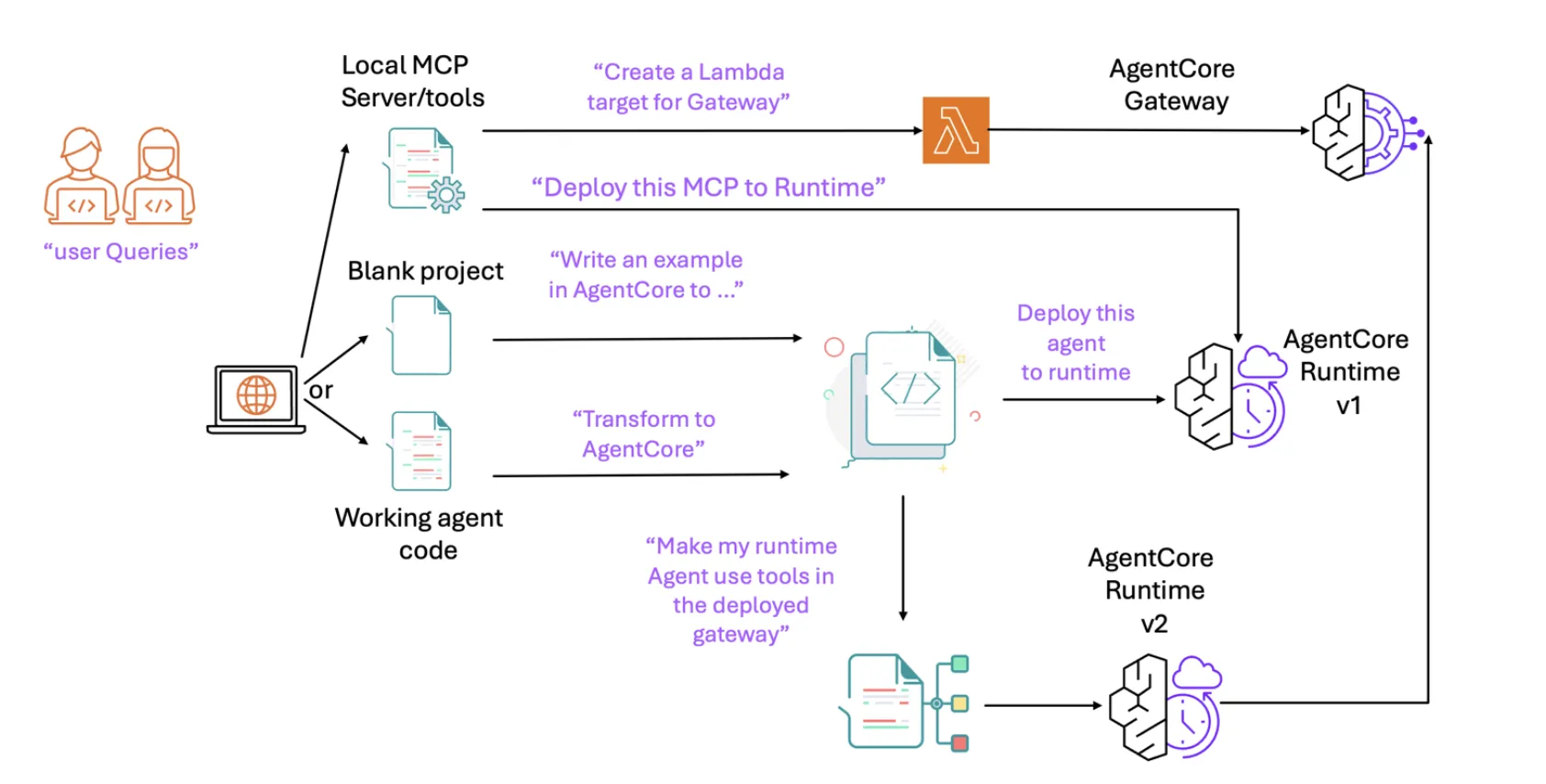
Amazon Web Services (AWS) has introduced an open-source solution for Amazon Bedrock AgentCore, designed to streamline the journey from natural language prompts within agentic Integrated Development Environments (IDEs) to fully deployable agents running on the AgentCore Runtime. This package automates key processes such as code transformation, environment setup, and integration with Gateway and tooling hooks, effectively condensing what traditionally requires multiple manual steps into simple conversational commands.
Understanding the AgentCore MCP Server
The AgentCore MCP (Model-Controller-Provider) server acts as a bridge between task-specific tools and client applications like Kiro, Claude Code, Cursor, Amazon Q Developer CLI, or the VS Code Q plugin. It facilitates a seamless workflow by enabling the assistant to: (1) refactor existing agents with minimal changes to align with the AgentCore Runtime architecture; (2) provision and configure AWS environments, including credentials, roles, permissions, Elastic Container Registry (ECR), and configuration files; (3) integrate the AgentCore Gateway for tool invocation; and (4) deploy and test agents-all directly from the IDE’s chat interface.
In practice, this server educates your coding assistant to transform entry points into AgentCore-compatible handlers, incorporate bedrock_agentcore imports, generate necessary dependency files like requirements.txt, and convert direct agent calls into payload-driven handlers suitable for the Runtime environment. It also leverages the AgentCore CLI to deploy and validate the agent, supporting end-to-end testing through Gateway tool integrations.
Installation Process and Client Compatibility
AWS simplifies installation with a one-click setup available via the GitHub repository. This process uses a lightweight launcher called uvx alongside a standardized mcp.json configuration file, which is compatible with most MCP-enabled clients. Typical mcp.json file locations include .kiro/settings/mcp.json for Kiro, .cursor/mcp.json for Cursor, ~/.aws/amazonq/mcp.json for Amazon Q CLI, and ~/.claude/mcp.json for Claude Code.
The repository is organized with the AgentCore server implementation housed in a dedicated directory, while the root contains links to comprehensive AWS MCP resources and detailed documentation to assist developers.
Architectural Insights: The Layered Context Model
AWS advocates for a layered context strategy to enrich the assistant’s understanding progressively. This approach begins with the agentic client context, followed by the AWS Documentation MCP Server, then framework-specific documentation such as Strands Agents and LangGraph, and finally the AgentCore and agent-framework SDK documentation. Additionally, per-IDE “steering files” help guide recurring workflows. This structured layering minimizes retrieval errors and enables the assistant to efficiently manage the entire transform, deploy, and test cycle without manual context switching.
Typical Development Workflow
- Initialization: Utilize local tools or MCP servers to bootstrap the environment. This may involve provisioning a Lambda function for the AgentCore Gateway or deploying the server directly onto the AgentCore Runtime.
- Code Authoring and Refactoring: Begin with existing codebases such as Strands Agents or LangGraph. The MCP server directs the assistant to adapt handlers, imports, and dependencies to ensure compatibility with the Runtime.
- Deployment: The assistant references relevant documentation and executes the AgentCore CLI to deploy the agent.
- Testing and Iteration: Interact with the agent using natural language prompts. If additional tools are required, integrate the Gateway (an MCP client embedded within the agent), redeploy updated versions, and perform subsequent testing cycles.
Impact on AI Agent Development
Traditional agent frameworks often demand developers to master cloud-specific runtimes, manage credentials, configure role policies, handle registries, and operate deployment command-line interfaces before meaningful iteration can begin. The AWS AgentCore MCP server shifts much of this complexity into the IDE assistant, significantly narrowing the gap between initial prompt and production-ready agent. As a standard MCP server, it integrates smoothly with existing documentation servers-such as those for AWS services, Strands, and LangGraph-and benefits from ongoing enhancements in MCP-aware clients. This makes it an accessible and efficient entry point for teams adopting Bedrock AgentCore as their AI agent platform.
Expert Perspective
The introduction of a dedicated MCP endpoint for AgentCore that integrates directly with IDEs is a notable advancement. The uvx-based mcp.json configuration simplifies client integration across platforms like Cursor, Claude Code, Kiro, and Amazon Q CLI. Moreover, the server’s tooling aligns seamlessly with the AgentCore Runtime, Gateway, and Memory stack, while maintaining compatibility with existing Strands and LangGraph workflows. This innovation effectively condenses the traditional prompt-to-refactor-to-deploy-to-test cycle into a streamlined, repeatable, and scriptable process, eliminating the need for custom integration scripts.





