
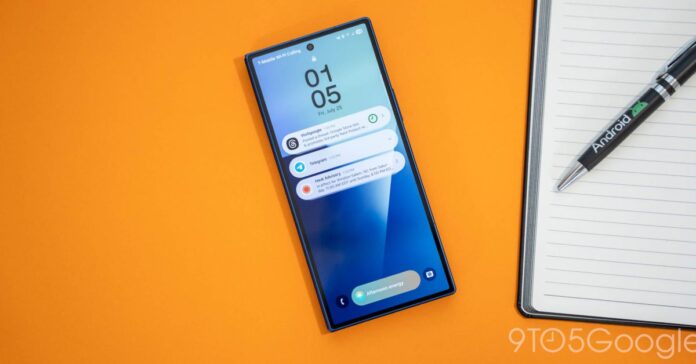
Samsung’s Impact on Android Notifications: A Closer Look
After adopting the Galaxy Z Fold 7 as my primary smartphone over the past few months, one persistent frustration has stood out: Samsung’s handling of Android notifications. It seems counterintuitive that a company would undermine one of Android’s strongest features. This article explores how Samsung’s modifications affect notification functionality and why many users might be unaware of these changes.
Android Notifications: A Strength Undermined
Android’s notification system is widely regarded as superior to iOS, offering granular control and flexibility. Unlike iOS, which often receives criticism for its limited notification management, Android allows users to customize how and when they receive alerts. However, Samsung’s approach to notifications on its devices often disables or hides some of these powerful features by default.
Disabling Notification Snooze: A Missed Opportunity
One particularly useful feature on stock Android devices, such as Google Pixel phones, is the ability to snooze notifications. This function lets users temporarily dismiss a notification and have it reappear later, helping manage interruptions effectively. Samsung, however, disables this feature out of the box, removing the convenient alarm clock icon that triggers snooze options. The rationale behind this decision remains unclear, but it undeniably diminishes user control.
Notification Categories: Customization Hidden Away
Another powerful Android feature is notification categories, which allow users to selectively mute certain types of notifications within an app. For example, on Instagram, you might want to receive alerts for direct messages but silence notifications for likes or comments. Samsung disables this granular control by default, forcing users to navigate deep into settings to reactivate it. This all-or-nothing approach limits personalization and can lead to notification fatigue.
The Broken Notification History Experience
Notification history is a valuable tool that lets users revisit dismissed notifications. On Google Pixel devices, tapping a notification from history opens the original content, preserving context. Samsung’s implementation, however, is flawed: accessing notification history requires multiple steps, and tapping an old notification merely launches the app’s main screen rather than the specific content. This degradation reduces the feature’s usefulness and frustrates users who rely on it.
Lockscreen Notifications: Default Settings That Hinder Usability
Samsung has also altered the default behavior of lockscreen notifications, often hiding them unless users manually adjust settings. This change undermines the convenience of quickly glancing at important alerts without unlocking the device. While these options remain available, the extra effort required to enable them means many users miss out on this functionality entirely.
Why Does Samsung Limit These Features?
The reasoning behind Samsung’s decision to disable or complicate access to these notification features is not publicly explained. It may stem from a desire to simplify the user experience or to differentiate their software layer, One UI, from stock Android. However, the unintended consequence is that many Galaxy users remain unaware of these powerful tools, reducing overall satisfaction and control.
Current Trends and User Awareness
Recent surveys indicate that over 60% of Samsung Galaxy users are unaware of advanced notification settings like snooze and categories. This lack of awareness means there is little demand for Samsung to revert these changes. Meanwhile, Android’s notification system continues to evolve, with Android 14 introducing enhanced notification management features that Samsung has yet to fully integrate.
Engage With Us: Your Thoughts on Samsung’s Notification Changes
Do you feel Samsung’s modifications to Android notifications detract from the user experience? Are you utilizing features like notification snooze or categories on your device? Share your experiences and opinions-let’s start a conversation about how manufacturers shape our interaction with Android’s core functionalities.
Latest Highlights in the Android Ecosystem
Wear OS 3.5 and Pixel Watch 4: A Leap Forward
Google recently launched the Pixel Watch 4 Series, accompanied by the rollout of Wear OS 3.5 for Pixel Watch 2 and 3 models. This update brings significant improvements in performance, battery life, and user interface, marking one of the most substantial upgrades in the Wear OS platform’s history. Early reviews praise the Pixel Watch 4 (41mm) for its refined design and enhanced health tracking, though some users note minor software quirks.
Additional Noteworthy Developments
- Pixel Fold Pro Review: Google’s latest foldable introduces subtle yet impactful refinements that better align with its “Pro” branding.
- Pixel Buds 2a: Positioned as the “Pixel 10” of headphones, these earbuds offer excellent sound quality and seamless integration with Android devices.
- Google Nest Doorbell: The newest model delivers improved video quality and smarter alerts, making it a compelling upgrade for smart home enthusiasts.
- Expanded Google Wallet Support: Now compatible with a tenth state ID on Android, enhancing digital identification options.
- Android October 16 Update: Rolling out with fixes for Pixel display issues and user interface enhancements.
Stay Connected
Follow the latest Android news and insights on social platforms including Twitter/X, Threads, Bluesky, and Instagram.

