
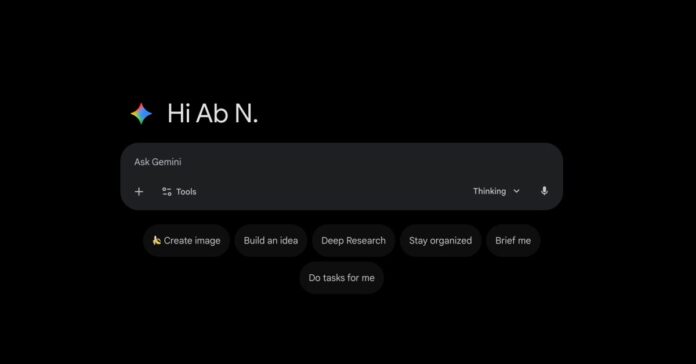
Google Gemini Web Application Gets a Fresh, Streamlined Interface
Following recent updates to its Android and iOS versions, Google has now introduced a comprehensive redesign of the Gemini web app. The revamp aims to deliver a minimalist and contemporary user experience, emphasizing clarity and ease of use.
Refined User Interface and Visual Enhancements
One of the subtle yet noticeable changes is the greeting message, which has shifted from a formal “Hello” to a more casual “Hi,” now accompanied by a distinctive Gemini spark icon positioned to the left. Upon loading the homepage, users are greeted with a smooth rotating animation featuring the Gemini logo, adding a dynamic touch to the initial interaction.
The prompt input area has been simplified by removing the previous faint outline container, creating a cleaner look. Additionally, the suggestion pills have been realigned to sit neatly centered beneath the prompt box, improving visual balance and accessibility.
Dark and Light Themes: A Polished Contrast
The dark mode on the Gemini homepage now adopts a true black background, enhancing contrast and reducing eye strain, while the prompt box, navigation rail, and drawer maintain their original color schemes for consistency. Meanwhile, the light theme has been subtly darkened to offer a more comfortable viewing experience without compromising readability. Notably, the conversation interface remains unchanged, preserving familiarity for returning users.
Introducing “My Stuff”: Centralized Access to Your Creations
A new feature called “My Stuff” has been added to the navigation drawer, showcasing a preview of three items by default. This section consolidates your images, videos, Canvas creations, and other generated content in one convenient location. Users can tap any item to open a fullscreen view, accessible directly via gemini.google.com/mystuff.
Enhanced Chat Management Options
Clicking on a chat’s title now reveals an expanded menu with several management tools, including options to share the conversation, pin it for quick access, rename the chat, or delete it entirely. These additions streamline conversation organization and improve user control over their chat history.
Seamless Integration with Google Photos
Separately from the visual redesign, Gemini has incorporated a direct Google Photos picker within the ‘plus’ menu, mirroring the functionality previously introduced for Google Drive. This integration simplifies the process of adding media by eliminating the need to download files before uploading them to Gemini, thereby enhancing workflow efficiency.
Gradual Rollout and Availability
The redesigned Gemini web app has been progressively released over recent weeks and is now accessible to all users worldwide. This update reflects Google’s ongoing commitment to refining user experience across its AI-powered platforms.
Looking Ahead: Gemini Expands to Google Maps Navigation
In related developments, Google has begun integrating Gemini technology into all navigation modes within Google Maps, promising smarter, more intuitive routing and assistance. This expansion underscores Gemini’s growing role in enhancing everyday digital interactions.

